AccessAudit for WordPress
A plugin that finds the accessibility problems that live in your HTML, tells you in plain words what to change, and shows you the exact markup responsible. Free, runs entirely on your own server, sends nothing anywhere, and never claims your site is compliant with anything.
Download the plugin (zip, about 40 KB) How to install it
Where to get it
We submitted this plugin to the WordPress.org directory on 13 October 2026, where it is waiting to be reviewed by their volunteers — that queue is long and moves at its own pace. Once it is listed you will find it by searching for AccessAudit under Plugins → Add New, and you will get updates automatically.
Meanwhile the download above is the same plugin, at the current version, and it is the file we build and
test on every change. It installs the same way, it sits in the folder accessaudit, and when the
directory listing appears WordPress will treat it as the same plugin and offer you updates as normal. The
only difference today is that you have to upload it yourself.
Install it
- Download the zip — do not unzip it.
- In WordPress, go to Plugins → Add New → Upload Plugin, choose the file, and press Install Now.
- Press Activate, then open AccessAudit in the admin menu.
- Press Run a scan now. It checks up to 50 pages of your own site, and shows you what it found. Fix the markup it quotes, then run it again.
Requires WordPress 6.0 or newer and PHP 7.4 or newer. No account, no API key, no sign-up.
What it finds
- Images with no
altattribute, and alt text that is really a file name - Links and buttons with no accessible name — the invisible icon link
- Form fields with no label, and labels that point at nothing
- Heading levels that skip, pages with no heading, empty headings
- Tables with no header cells, frames with no title, duplicate
idvalues - Links that open a new window without warning, zoom-blocked viewports, positive tabindex
- …and the rest of a fixed list of 25 checks. Every finding quotes the markup that caused it, so you can check our work in seconds.
Two places where it helps you fix things, not just find them
In the editor. Press Check this draft while you are writing a post and it tells you what is wrong with the page you are about to publish, before you publish it. Every finding from a scan also has a Take me to it link that selects the block the problem came from and scrolls to it.
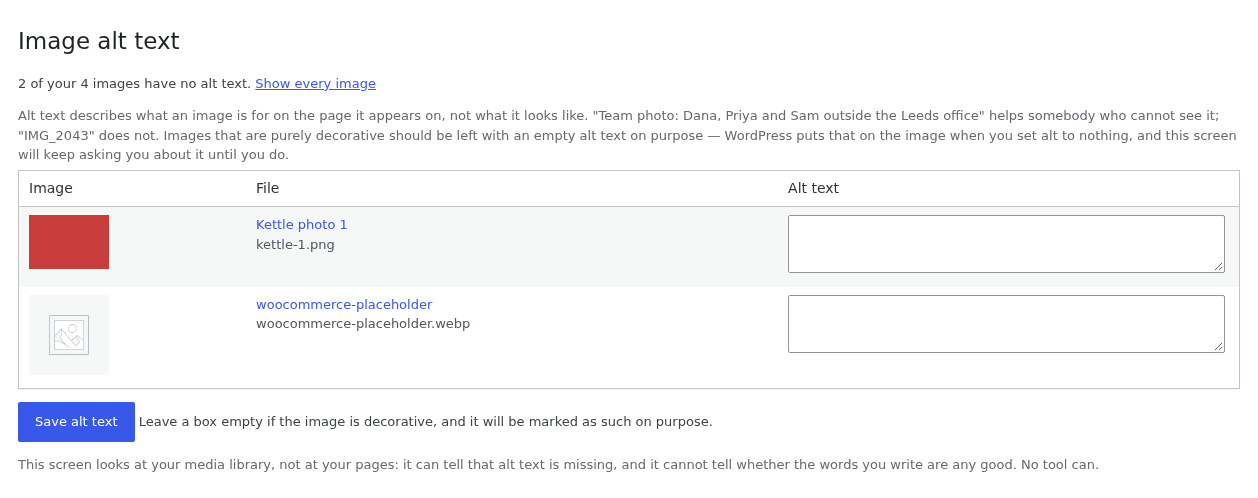
In your media library. An Image alt text screen lists every image with nothing filled in, with the box to type in right there and one Save button for the lot. Findings about images point at it, because a list of problems you cannot act on is just an accusation.
What it will not tell you
It cannot see colour contrast, it cannot judge whether your alt text is useful, it cannot tell how the page behaves with a keyboard or a screen reader, and it does not give you a score out of a hundred or a badge. A clean scan means your work list got shorter, not that your site complies with the ADA, the European Accessibility Act or WCAG. We wrote a whole page about that, and an honest comparison with the other plugins because it is the part most tools mumble.
Nothing leaves your server
The plugin fetches your own pages over your own site's HTTP connection and analyses the HTML in PHP on your machine. There is no account, no telemetry, no external service, and no data about your site or your visitors sent to us or anyone else. It is free software under the GPL, and the licence does not change if you stop using it.
If you look after other people's sites
The plugin is for one site. AccessAudit Station is for agencies: it runs on any PHP host of yours, watches a list of client sites on a schedule, tells you what broke since last time, emails you when a scan could not read a site at all, and prints a report you can hand over under your own name. Up to three client sites work without a licence key, for as long as you like, so you can judge it on real work. How it works for agencies · Pricing